Quickstart — your first extraction
Updated
1. Get an API key#
Sign in to the client portal at https://app.docxtract.io/ and generate a key from Settings. Keys look like sk_ followed by 32 hex characters.
sk_ with an underscore is a DocXtract key. sk-
with a hyphen belongs to a different API provider and will not authenticate here.2. Find out which document types your key can use#
curl https://api.docxtract.io/v3.1/models \
  -H "Authorization: Bearer YOUR_API_KEY"
This call costs no credits, so use it freely — including to populate dropdowns in your own UI. It returns only the document types your key is permitted to use.
3. Extract a document#
curl -X POST https://api.docxtract.io/v3.1/documents \
  -H "Authorization: Bearer YOUR_API_KEY" \
  -F "file=@invoice.pdf" \
  -F 'options={"model":"invoice"}'
Accepted files: PDF, JPG, PNG, up to 10 MB and 150 pages.
options is a JSON string in a form field, not nested form data. And if you
omit document_type/model, it defaults to invoice — a passport sent without it is
extracted as an invoice. Always set it explicitly.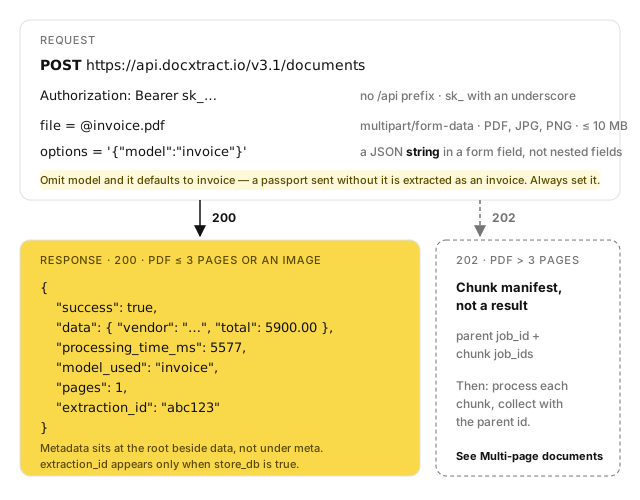
4. Read the response#
{
  "success": true,
  "data": { "vendor": "ABC Suppliers Pvt Ltd", "total": 5900.00 },
  "processing_time_ms": 5577,
  "model_used": "invoice",
  "pages": 1,
  "extraction_id": "abc123"
}
Metadata sits at the root level beside data, not nested under meta. The field is extraction_id, not id, and it appears only when store_db is true.
data varies by document type — an invoice returns vendor/totals/line_items, a passport returns name/number/dob. Only the envelope is stable, so treat data as an open map.
5. Handle the multi-page case#
A PDF of more than 3 pages does not return 200. It returns 202 with a chunk manifest and requires two more calls. This is not optional and cannot be turned off, so any integration that accepts arbitrary PDFs must handle it — see Multi-page documents.
Base URL#
https://api.docxtract.io/ — with no /api prefix. The endpoint is /v3.1/documents.
docxtract.rpatech.ai is a legacy alias that redirects here; do not use it in new code.
Next steps#
- API versions — build against v3.1
- Error codes — branch on
error.code, never on the message - Interactive reference and Postman collection:
https://app.docxtract.io/api-reference.php
Something wrong or missing on this page? Tell us.