Invoice Desk (Node.js)
Updated
What it does#
Drop invoices, extract headers and line items, check that the numbers add up, flag anything that does not, correct it with a note, export CSV or JSON.
Source: invoice-desk in the examples repository.
Run it#
Requires Node 20+. No database.
cd invoice-desk
npm ci
npm start
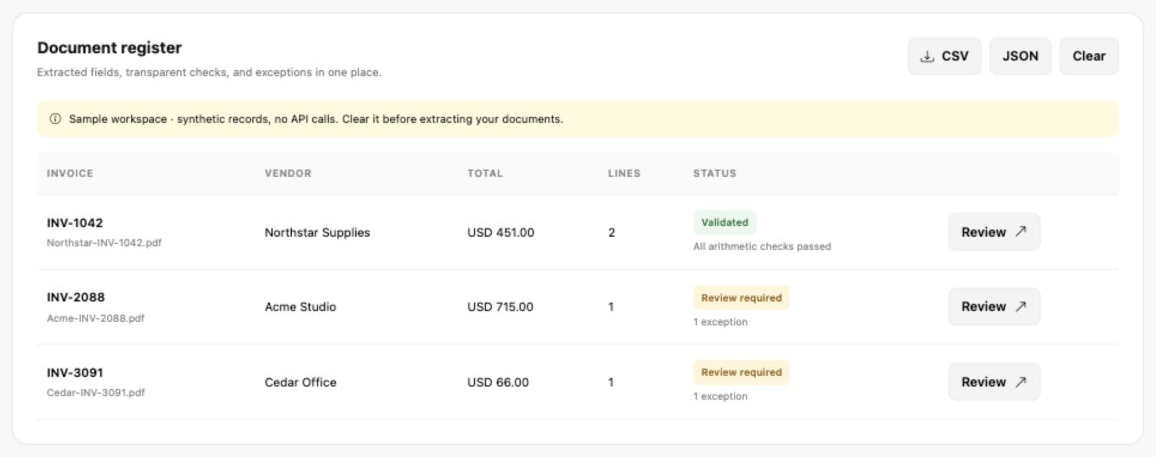
Open http://127.0.0.1:3101 and choose Explore sample data. Three synthetic invoices load: one validates, one has a line whose quantity times price does not equal its amount, and one has no tax amount at all.
The SDK calls#
The whole backend is one file, server.js, with three routes. Only two of them touch DocXtract.
Connect lists the templates the key can use. It costs no credits.
import { DocXtract } from '@docxtract/sdk';

const dx = new DocXtract({ apiKey, maxRetries: 2 });
const models = await dx.models();
Extract writes the upload to a private temp folder, calls the SDK, and removes the folder whatever happens.
folder = await mkdtemp(path.join(tmpdir(), 'invoice-desk-'));
const filename = path.join(folder, 'document' + ext);
await writeFile(filename, bytes, { mode: 0o600 });

const options = { document_type: settings.documentType || 'invoice', store_db: false };
if (settings.model?.trim()) options.model = settings.model.trim();

try {
  const result = await dx.extract(filename, options);
  return { raw: result.data, meta: result.meta, complete: result.complete };
} finally {
  if (folder) await rm(folder, { recursive: true, force: true });
}
extract() handles multi-page PDFs itself, so the app has no chunking code. See Multi-page documents for what it does underneath.
The third route, analyse, runs the validation rules against extracted JSON. It makes no API call, which is why corrections in the UI are free.
The validation rules#
The interesting part of the app is not the extraction. It is what happens after.
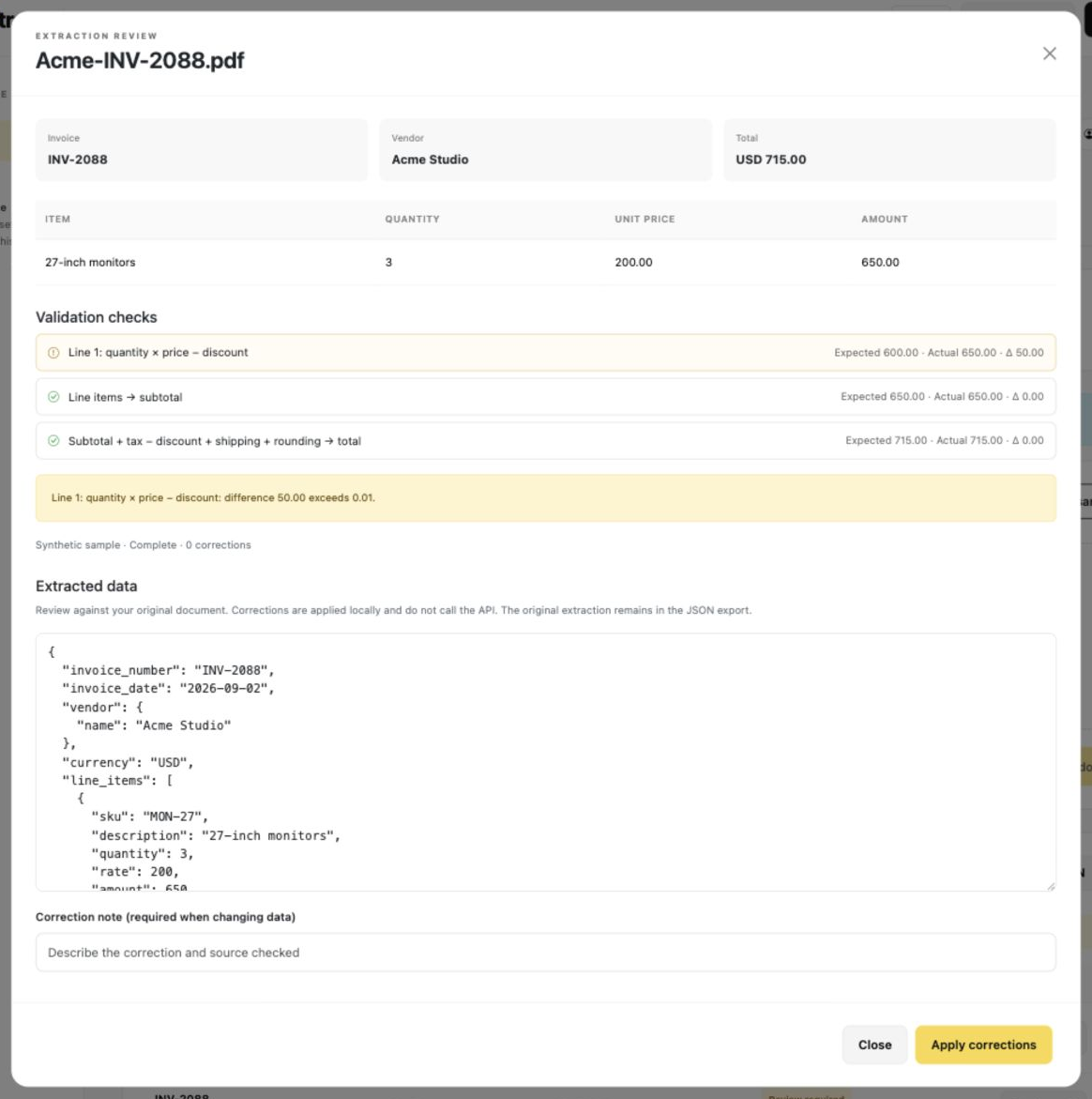
- Each line: quantity × unit price − line discount = line amount.
- Line amounts sum to the subtotal.
- Subtotal + tax − document discount + shipping + rounding = total.
- Missing invoice number, vendor, currency, line items or required totals send the invoice to review. A missing tax is unknown, not zero. An explicit zero is accepted.
- Header tax can be read directly or summed from
cgst,sgst,igstandvatwhen they are present. A percentage string is not a tax amount. - The same vendor and invoice number appearing twice in the workspace is flagged.
- The default tolerance is 0.01 currency units, configurable from 0 to 100.
The sample data is chosen to show why line-level checks matter: one invoice has a subtotal and total that agree while a single line is off by 50.00.
Field mapping#
The default mapping expects invoice_number, vendor.name, currency, line_items, subtotal, tax and total, with common aliases such as items, qty, unit_price and grand_total. If your template uses other keys, map them in Settings. Paths are relative to the SDK's data object.
{"number":"Header.InvoiceNumber","vendor":"Header.SupplierName","items":"LineItems","quantity":"Qty","rate":"UnitPrice","total":"Totals.GrandTotal"}Where things are#
| File | Purpose |
|---|---|
server.js | HTTP server, the three routes, SDK calls, temp-file cleanup |
includes/invoices.js | Normalisation and arithmetic checks |
includes/config.js | Port, upload limit, defaults |
includes/*.php | HTML-only view fragments. Node concatenates them, so no PHP runtime is needed |
tests/invoices.test.js | Rules, rounding, strict number parsing, mappings, cleanup |
npm testserver.js. It refuses anything not from
localhost, and checks a custom header and the Origin. That is enough for a local tool.
A hosted app needs real authentication in front of the extract route, because every call
spends your credits.Something wrong or missing on this page? Tell us.