Example applications
Updated
Three complete apps, one per SDK#
The SDK pages show the calls. These three applications show the calls inside a working product: a browser UI, a small backend in the SDK's language, validation logic, exports and tests. Each is independent, runs on your machine, and is open source under the MIT licence.
| Application | What it does | Backend | Article |
|---|---|---|---|
| Invoice Desk | Extracts invoices, checks the arithmetic, flags exceptions, exports CSV/JSON | Node.js | Invoice Desk |
| Resume Screening Desk | Extracts CVs and a job description, ranks candidates against criteria you review | Python / Flask | Resume Screening Desk |
| PO vs Invoice Matcher | Extracts a purchase order and an invoice, compares them line by line | PHP | PO vs Invoice Matcher |
Source: github.com/docxtractio/examples.
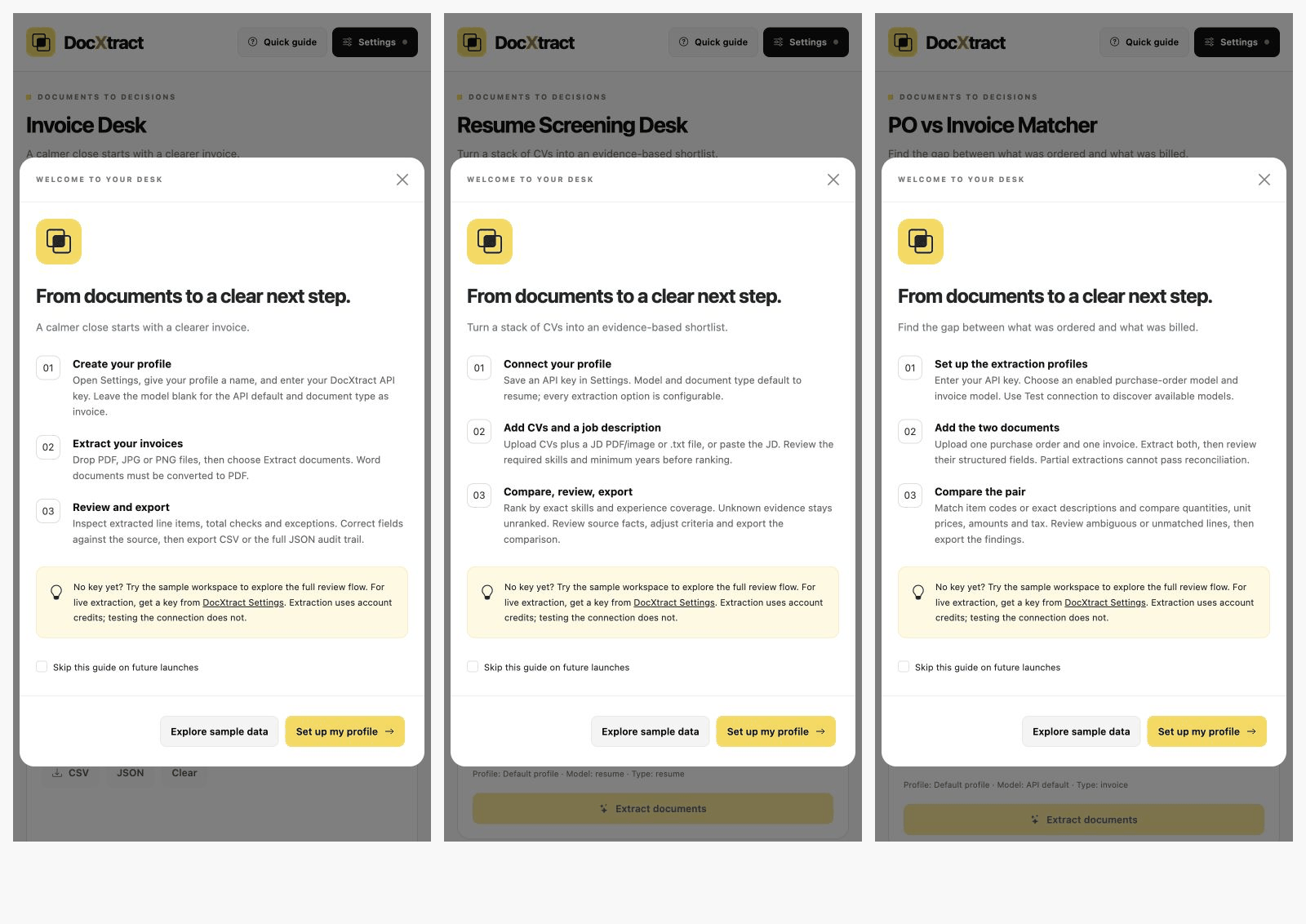
Try them without an API key#
Every app opens with a launch guide offering Explore sample data. That path loads synthetic documents and never calls the extraction service, so you can see the whole workflow, including corrections and exports, before spending a credit.
To run against your own documents choose Set up my profile, paste a key beginning with sk_, and press Test connection & load models. That call authenticates and lists the document types enabled for your key. It costs no credits. Extracting a document does.
Running them#
Clone the repository and start each app from its own folder. Each README has the install steps for a clean checkout; once installed, ./start.sh launches it.
| Application | Requires | Local URL |
|---|---|---|
| Invoice Desk | Node 20+ | http://127.0.0.1:3101 |
| Resume Screening Desk | Python 3.10+ | http://127.0.0.1:3102 |
| PO vs Invoice Matcher | PHP 8.1+ with curl, Composer | http://127.0.0.1:3103 |
The apps bind to 127.0.0.1 only. They are local tools with no accounts, no hosted database and no public deployment.
What the apps have in common#
All three follow the same shape, so once you have read one you can read the others.
- The browser never holds the SDK. The page posts the file and the key to the app's own backend, which calls DocXtract. The key is a billable credential and must stay server-side.
- Model discovery before extraction.
models()is called first so the user picks a template their key can actually use, instead of learning that from a failed extraction. document_typewith an optionalmodeloverride. Both select the same template. A nonblank model wins. Invoice extraction leaves the model override blank; resumes default toresumeand purchase orders topurchase_order. All are configurable.store_db: falseon every extraction. The extracted JSON is returned to the caller and not retained on the server side.- Temporary files are always deleted. The upload is written to a private temp directory with restrictive permissions and removed in a
finallyblock or context manager, whether the extraction succeeded or not. - Keys are redacted from error messages before they reach the browser.
- Unknown is not zero. A missing tax amount, an unknown years-of-experience, a line with no identity: each blocks a clean result and asks for review rather than silently passing.
- Corrections are recorded, not overwritten. Exports carry the original extraction, the corrected data and the correction notes.
A checklist for your own integration#
Borrow these directly. They are the decisions most likely to be wrong in a first integration.
- Call the SDK from your backend, never from the browser or a mobile app.
- Read the key from the environment or a secrets store, not from source.
- Call
models()once to find which document types are enabled for the key. - Pass
store_db: falseunless you need DocXtract to retain the result. - Delete uploaded bytes after the extraction returns, in a
finally. - Treat a partial multi-page result as partial. The SDK result exposes
complete. - Do not run extractions in parallel from one key. The default limit is 10 requests per minute and parallel chunks only produce
429. See Rate limits. - Validate before you trust. Check arithmetic, required fields and identities, then send the exceptions to a person.
localStorage and keys in sessionStorage
because they run on your own machine. Do not copy that part into a hosted product. On a
server, a key belongs in the environment.Which one to read first#
Read the app in the language you will use. If you are choosing a language, Invoice Desk is the shortest and shows the full pattern in one file.
Something wrong or missing on this page? Tell us.