Choose your integration path
Updated
Start here#
DocXtract has two kinds of user, and the right path is very different for each. Pick before you build.
| If you are… | Use | Code needed |
|---|---|---|
| A business or ops team processing documents in tools you already use | A connector | None |
| A developer embedding extraction in an application | An SDK | Yes |
| Neither fits — an unusual stack or language | The REST API directly | Yes |
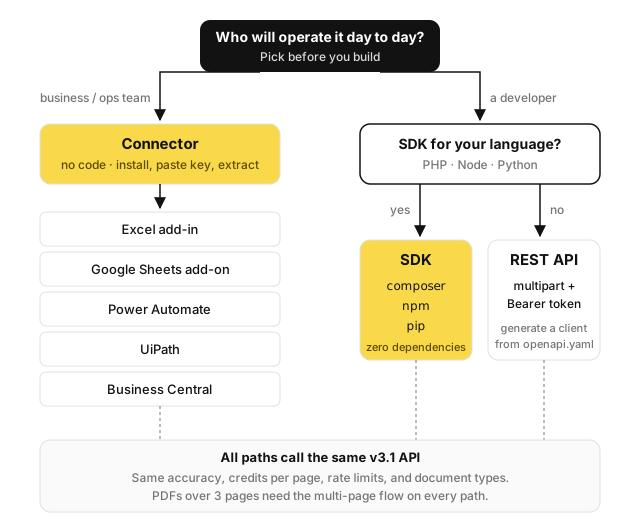
Most document-extraction work does not need a developer. If your documents arrive as email attachments or sit in a shared drive and the output belongs in a spreadsheet or your ERP, a connector will get you there faster than any amount of code.
No-code: connectors#
Six are available today:
| Connector | Good for |
|---|---|
| Excel add-in | Extracting into a workbook you already work in |
| Google Sheets add-on | The same, for Sheets; bulk extraction and field mapping |
| Power Automate | Flows — email attachment arrives, extract, write to SharePoint or Dataverse |
| UiPath | RPA processes already running in your organisation |
| Business Central | Pushing extracted invoices straight into Dynamics 365 BC |
| Folder Watcher | A folder of files on a PC or server, extracted to Excel by a script, optionally on a schedule |
See the connectors overview.
Code: pick your language#
| SDK | Install | Notes |
|---|---|---|
| PHP | composer require docxtract/php-sdk | No dependencies |
| Node | npm install @docxtract/sdk | No dependencies; TypeScript types included |
| Python | pip install docxtract-sdk | Standard library only |
All three expose the same surface and are dependency-free, so they will not conflict with anything already in your project.
extract() call. This is the single biggest source of
integration bugs.No SDK for your language?#
The REST API is plain multipart/form-data with a Bearer token — usable from anything that speaks HTTP. Read multi-page documents before you ship: you must handle the 202 branch yourself.
The OpenAPI 3.1 contract describes every endpoint, so you can generate a client for your language.
Recommended order#
- Sign up and generate a key in the portal
- Call
modelsto see which document types your key allows — free, no credits - Try a real document in the portal's Test API page — no code
- Copy the generated snippet, or import the Postman collection
- Pick a connector or an SDK
- Read multi-page documents before going live
Steps 2 and 3 cost nothing but confirm the platform handles your documents — worth doing before writing any code.
Something wrong or missing on this page? Tell us.